RAM vs Query Tradeoff
A dimension order with the smallest RAM footprint is not always the fastest at querying. OptimusPy measures both and recommends the order that's within reach of the best on every metric at once, rather than the winner on one of them.
Why they're different
TM1 stores cube data sparsely. The dimension order affects:
- Compression efficiency (RAM): orders that group dense dimensions together compress better.
- Stargate view shape (query time): orders that put query-leading dimensions first generate more useful aggregates.
These goals can pull in different directions. A small dimension early in the order is often great for RAM but bad for queries that filter on it, because the stargate has to materialize many slices.
Composite query time
When you specify views, OptimusPy runs each view N times (executions), takes the median per view, then takes the median across views. Lower is better.
view_medians = [median(times_for_view_1), median(times_for_view_2), ...]
composite_query_time = median(view_medians)
If you don't specify any views, query time is not measured and the comparison is on RAM alone (and on process time, if you gave processes).
Composite process time
When processes is set, the same logic applies: the median of per-process medians. Process time counts as a metric in its own right, so the recommended order can't be one that makes your load noticeably slower, even if it has the fastest queries.
RAM
Just one number per order: the cube's total memory. It's read once, for the original order, through the TM1py Metrics service (cube_memory_used, the same on v11 and v12). Every other order's RAM is derived from the percentage change the server reports when it applies the reorder, so the figure reflects the reorder itself and no query has to run first. See How It Works.
Picking the best result
There's no combined score, because a weighted formula would hide the tradeoff instead of exposing it. Instead, for each metric that was measured (RAM always, query time if views are set, process time if processes are set), OptimusPy takes the range between the best and worst value across all tested orders, then:
- Sets a tolerance of 1% of that range above the best value.
- Walks the orders in the order they were tested and picks the first one that is within the tolerance on every measured metric. The original order is tested first, so it wins a tie.
- If no order qualifies, it retries with 2.5%, then 5%.
- If still no order qualifies, it restores the original order and the log says to pick one manually from the results.
When RAM is the only metric (no views, no processes), there's no trade-off to balance, so the recommendation is the lowest-RAM order. The original order still wins if it's within the 1% tolerance, because then a reorder would buy nothing measurable.
The practical consequence is that the recommended order is a balance, not an extreme: an order that saves the most RAM but doubles query time won't be picked, and neither will the fastest order if it costs a lot of memory. The report's podium shows the single best order per metric next to the Best Overall card, so you can see what each extreme would have cost.
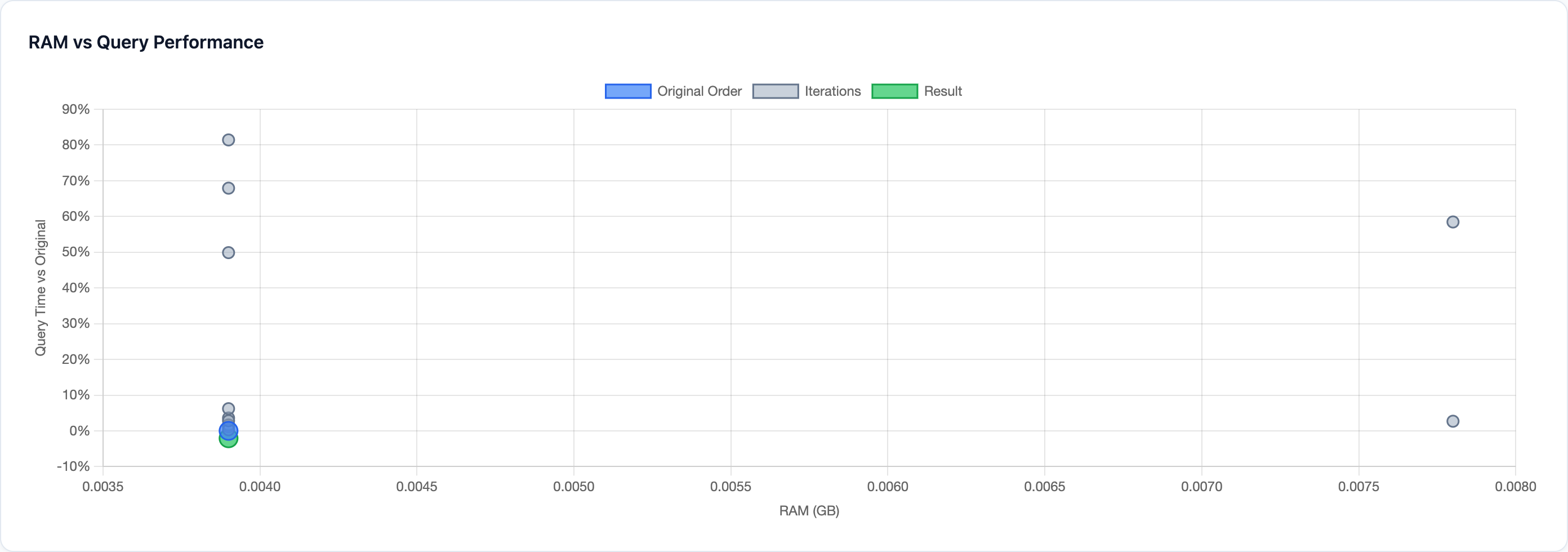
The HTML report's scatter chart plots RAM against query time so you can see the full picture, not just the winner. Sometimes an order that's slightly worse on one metric is dramatically better on the other, and the scatter view makes that obvious.