Predefined Orders
Skip the greedy search and benchmark a hand-picked list of dimension orders. The fastest, most controlled way to compare a few candidates head-to-head.
When to use
- You've followed TM1 best practices (small dims first, string dims last, density rules) and want to confirm which of two or three candidates wins.
- A colleague proposed an order and you want to compare it against the current one.
- You're A/B testing the result of a Greedy run against the original to confirm the gain.
JSON config example
{
  "instance": "tm1srv01",
  "cube": "Sales",
  "views": ["Optimus_Sales_View"],
  "executions": 5,
  "output": "csv",
  "predefined_orders": [
    ["Time", "Version", "Product", "Customer", "SalesMeasure"],
    ["Customer", "Product", "Version", "Time", "SalesMeasure"],
    ["Product", "Customer", "Time", "Version", "SalesMeasure"]
  ]
}
OptimusPy benchmarks only these three orders. The original order is also evaluated automatically as a baseline. No greedy search, no extra iterations.
Building orders in the UI
On the Optimize page, the Configure tab with Mode: Predefined opens a builder. Drag dimensions to reorder them, then click Add Order to save. The builder shows the leaf element count next to each dimension to help you sort by size at a glance.
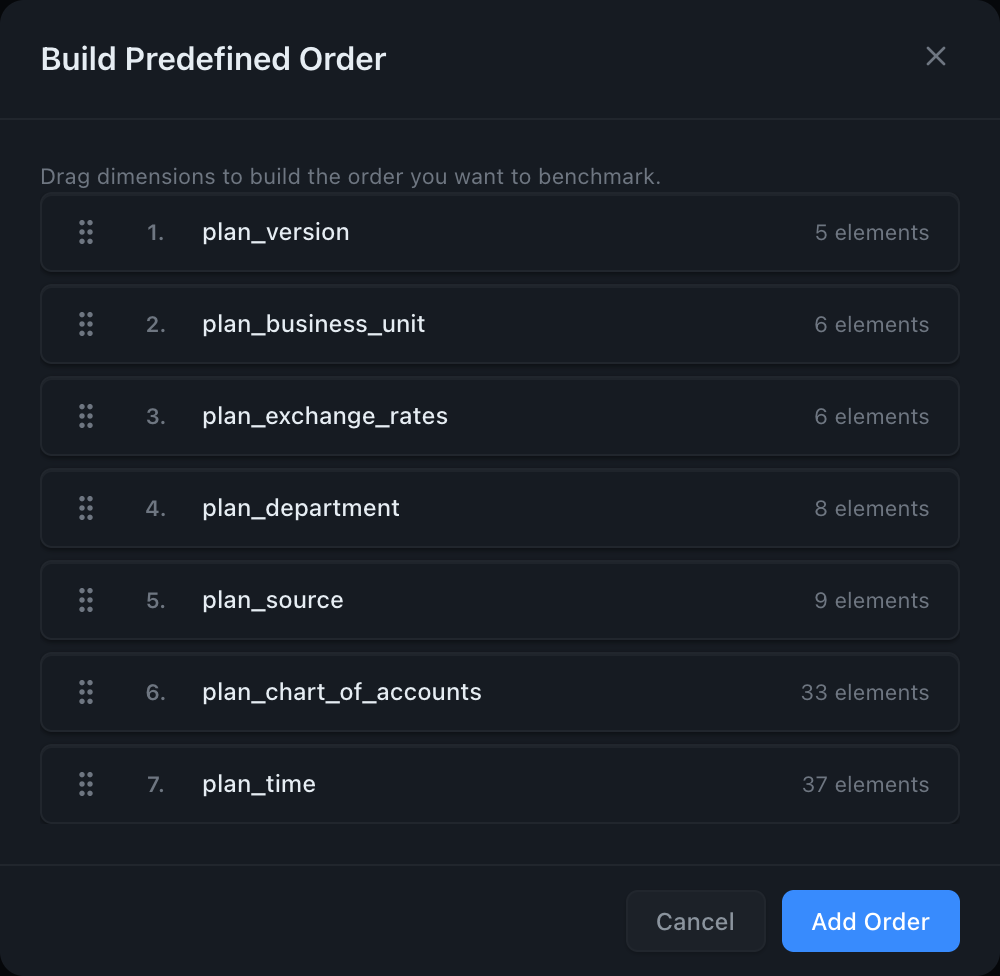
You can add multiple orders to test them all in one run.
Interaction with orders_to_ignore
orders_to_ignore is ignored in predefined mode, because you've already listed every order you want tested and there's nothing to filter out. The same goes for dimensions_to_exclude and dimension_position_rules: they don't constrain a predefined list. Position rules are still validated, though, so a typo in one fails the run before anything is applied.
A malformed order fails the run before anything is applied
The list is validated twice at startup, and no reorder is sent if either gate fails.
First, before connecting to TM1, on shape alone:
Then, once the cube's storage order has been read, every entry must be a permutation of it, so a typo, a missing dimension or an extra one is caught with the offending index named:
ERROR: Invalid predefined_orders for cube 'Sales':
  predefined_orders[1]: order is not a permutation of the cube's dimensions
  ['Time', 'Version', 'Product', 'Measures']: ['Time', 'Version', 'Prodcut', 'Measures']
Every bad entry is reported at once, so a config is fixed in one pass rather than one run per typo, and the check runs before the first reorder specifically so that a typo in entry 5 cannot fail the run with entries 1-4 already applied to the cube.
An order that moves the locked dimension is skipped, not fatal
If the cube's storage-last dimension has string elements, that slot is locked. An entry that moves it is well-formed (you asked for something coherent that TM1 will simply refuse), so OptimusPy skips that entry and carries on with the rest of the list. The run does not fail and does not stop.
The skipped order produces no result and is not in the result count. The reason is logged at DEBUG (-v to see it), with the total at INFO:
So a three-order list where one entry moves the locked dimension benchmarks two orders plus the original baseline. If you expected three, check the skip count before concluding the run was short.
CLI
The repository includes samples/optimize_predefined.json as a starting point.
Output is identical to greedy mode: same HTML report, same CSV/XLSX, same podium. The only difference is the iteration count, and that the log shows Iteration 2 of 3, because here the total is known upfront.